A burglary happens every 25.7 seconds in the United States, according to FBI crime data — and most break-ins happen through ground-floor entry points that a well-placed indoor camera could have captured on video. In 2026, indoor home security cameras have become smarter, sharper, and more affordable than ever, making it easier than you might think to build a solid surveillance setup without spending a fortune. Whether you're watching over a baby's nursery, keeping tabs on pets while you're at work, or monitoring the front door while you travel, there's a camera on this list built for your exact situation.
The tricky part isn't finding a camera — it's finding the right one. Resolution, night vision quality, subscription fees, local storage options, and smart home compatibility all vary dramatically from model to model. We've reviewed dozens of options and narrowed it down to the seven best indoor security cameras you can buy right now. Check out our full security product reviews for even more expert recommendations beyond cameras.
Before you buy, it's worth understanding how these devices connect to your network and what data they send to the cloud. If you're concerned about keeping your smart devices secure, read our guide on how to prevent your smart home from being hacked — it covers router settings, password hygiene, and firmware update habits that apply directly to security cameras.
Contents
Our Top Picks for 2026
- #PreviewProductRating
- Bestseller No. 1
 Rating:

- Bestseller No. 2
 Rating:
 - Bestseller No. 3
 Rating:
 - Bestseller No. 4
 Rating:
 - Bestseller No. 5
 Rating:
 - Bestseller No. 6
 Rating:
 - Bestseller No. 7
 Rating:

Product Reviews
1. WYZE Cam Pan v3 (2-Pack) — Best Value Pan/Tilt Camera
If you want serious coverage without a serious price tag, the WYZE Cam Pan v3 two-pack is one of the best deals in home security right now. Each camera delivers full 1080p HD video with 360° pan and 180° tilt, so you can cover an entire room — or swing the view toward the door when an alert fires. You can program up to four custom waypoints (preset positions the camera automatically patrols), which makes it genuinely useful for monitoring large living areas, open-plan kitchens, or wide garages.
The color night vision is the real standout feature. Most budget cameras switch to washed-out black-and-white after dark. The WYZE Cam Pan v3 keeps color intact in low-light environments, so you can actually tell if the person in your hallway is wearing a blue hoodie or a black one. The AI-powered motion tracking locks onto people and pets and follows them smoothly — there's minimal lag or jitter, which isn't always the case with pan/tilt cameras in this price range. The IP65 rating also means it handles humidity and dust well if you want to place it near a window or in a garage. Note that it's not compatible with 5GHz Wi-Fi only networks — you'll need 2.4GHz available.
Getting two cameras in the box makes this pack exceptional value. Setup takes under five minutes per camera using the Wyze app, and both Alexa and Google Assistant voice control are supported out of the box. Free cloud storage is limited to a 14-day rolling window, but the cameras also support a microSD card for continuous local recording.
Pros:
- Two cameras in the box — outstanding value per dollar
- Color night vision keeps detail in low-light scenes
- AI motion tracking follows people and pets accurately
- 360° pan + 180° tilt covers an entire room with one camera
- IP65-rated — handles dust and moisture
- Works with Alexa and Google Assistant
Cons:
- 2.4GHz only — no 5GHz Wi-Fi support
- Some advanced AI features require a Wyze Cam Plus subscription
- App can feel cluttered with upsell prompts

2. Blink Mini — Best Budget Plug-In Camera
The Blink Mini is proof that you don't need to spend much to get solid indoor monitoring. This compact plug-in camera shoots 1080p HD video with night vision and connects directly to your existing Alexa ecosystem if you already own Echo devices. The setup process is genuinely painless — plug it in, scan a QR code in the app, and you're live in under two minutes. For first-time camera buyers, it doesn't get easier than this.
Motion detection zones let you customize exactly which areas of the frame trigger an alert, so you're not bombarded with notifications every time your cat walks past. Two-way audio works reliably — you can speak to someone in the room clearly through your smartphone. Live view loads quickly compared to some competitors. The camera's small, cube-like form factor blends into most rooms without drawing attention, which is useful if you prefer discreet monitoring.
The main trade-off is storage. Blink requires either a Blink Subscription Plan for cloud video storage or a locally connected Sync Module 2 with a USB drive for free local storage. Without one of those, you only get live view — no saved clips. If you're already in the Amazon ecosystem and want a no-fuss starter camera, this is the one to grab. It also pairs well with Echo Show devices for quick visual check-ins without even picking up your phone.
Pros:
- Extremely affordable entry price
- Near-instant setup — under two minutes
- Customizable motion detection zones
- Clear two-way audio
- Deep Alexa integration — works with Echo Show displays
- Compact, low-profile design
Cons:
- Cloud storage requires a paid Blink subscription
- Local storage requires the separately sold Sync Module 2
- No pan/tilt — fixed field of view only
3. Ring Indoor Cam — Best for the Ring Ecosystem
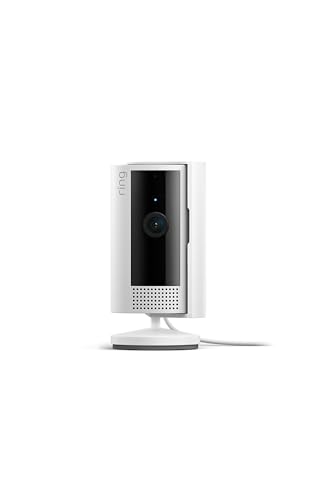
If you already have a Ring doorbell or Ring Alarm system, adding the Ring Indoor Cam makes your setup feel complete. Everything feeds into one app, one dashboard, one notification stream. The camera records in 1080p HD with color night vision, so the footage you see after dark isn't the grainy green-tinted blur that plagued older cameras — you get actual usable video in full color.
The Advanced Pre-Roll feature is genuinely useful. It captures a few extra seconds of video before a motion event triggers, so you see what led up to the alert rather than just the aftermath. That context matters when you're trying to figure out what set off an alert at 2am. The physical Privacy Cover is another practical addition — twist it shut and both the camera and microphone are hardware-disabled. No software workarounds, no relying on the app. That's a meaningful privacy safeguard you don't get on every indoor camera.
Ring's subscription (Ring Protect) is required for cloud video storage and event history. Without it, you get live view only. If you're already paying for Ring Protect for your doorbell, adding an indoor cam costs nothing extra on the plan. The camera's clean white design fits most interiors without standing out, and the compact footprint means it fits on a shelf, mantle, or countertop without taking up much space.
Pros:
- Seamless integration with Ring doorbells and Ring Alarm
- Advanced Pre-Roll captures footage before the motion event
- Physical Privacy Cover — hardware-level mic and camera disable
- Color night vision delivers usable color footage after dark
- Compact, clean design suits most rooms
Cons:
- Ring Protect subscription required for video history and saved clips
- No local storage option
- Less compelling if you're not already in the Ring ecosystem
4. Arlo VMS3130 — Best Wire-Free Indoor Setup
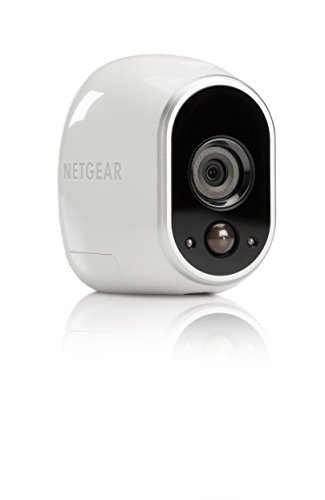
The Arlo VMS3130 takes a different approach from plug-in competitors: it's 100% wire-free, running on a rechargeable battery with no power cable required. That gives you total placement freedom — mount it at ceiling height, tuck it behind a plant, or reposition it seasonally without running any wires. It ships with its own Base Station (hub), which handles local storage and communication, so your video clips don't depend entirely on your home's Wi-Fi router.
The camera uses a 110-degree field of view, which covers a wide room well in a fixed installation. Night vision performance is solid in complete darkness — the infrared LEDs illuminate clearly at typical indoor distances. Alexa voice control is supported. The cloud storage tier includes free seven-day rolling history for up to five cameras, which is more generous than many competitors offer without a subscription.
The main limitation to know going in: this camera does not record audio. No two-way talk, no microphone. For pure video surveillance that's fine, but if you want to speak to someone in the room or hear what's happening, look at another model on this list. The system requires the Base Station to function — you can't just connect the camera directly to Wi-Fi — but that Base Station also doubles as local NAS (network-attached storage) backup, which is a real advantage for privacy-minded buyers.
Pros:
- Completely wire-free — place it anywhere without drilling near an outlet
- Ships with its own Base Station for local storage
- Free seven-day cloud storage included
- Works with Alexa for voice control
- 110-degree wide-angle field of view
Cons:
- No audio — no microphone, no two-way talk
- Requires Base Station — can't operate as a standalone Wi-Fi camera
- Older generation hardware compared to newer Arlo models
5. Google Nest Cam Indoor (1st Gen) — Best 24/7 Continuous Recording
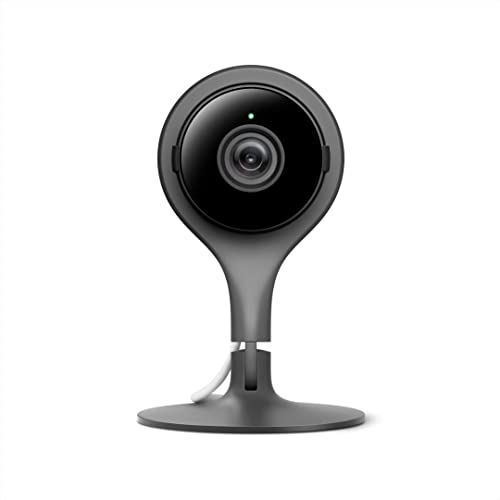
Most indoor cameras only record when motion is detected. The Google Nest Cam Indoor streams and records 24/7 in full 1080p HD — every minute, whether something's happening or not. That continuous recording is the defining feature here. You're not relying on a motion trigger to catch a critical moment; you have a complete timeline you can scrub through at any point. For households where you need airtight coverage — a home office, a busy entryway, or a space shared with contractors or caregivers — that matters.
Eight high-power infrared LEDs power the night vision, providing clear illumination in complete darkness at the ranges you'd encounter indoors. Mobile alerts fire quickly when the camera detects activity, and the three-hour snapshot history (available without a subscription) gives you a basic events timeline at no cost. The camera uses a magnetic base with a flexible stand, making it easy to angle precisely without tools.
To unlock the full 24/7 video history and smart detection features, you'll need a Google Nest Aware subscription. Without it, you get live view and the three-hour snapshot history. This is a first-generation model, so it lacks some of the newer features found in the second-gen Nest Cam — but if 24/7 continuous recording is your priority and you're already in the Google ecosystem, it delivers. Check out our complete overview of Google Nest for more on how the Nest platform works across devices.
Pros:
- 24/7 continuous recording — not limited to motion events
- Full 1080p HD with strong infrared night vision
- Fast mobile alerts with event detection
- Three-hour snapshot history without a subscription
- Deep Google Home integration — works with Assistant and Nest Hub displays
Cons:
- Nest Aware subscription needed for full 24/7 history and smart alerts
- First-generation hardware — newer Nest Cam models offer more features
- Wired only — no battery option
6. REOLINK E1 Pro 3K — Best for Baby and Pet Monitoring
When you're monitoring a nursery, a pet crate, or a toddler's room, image quality in dim conditions is non-negotiable. The REOLINK E1 Pro answers that with a 3K 5MP resolution sensor (2880×1616) paired with an F1.6 aperture lens — one of the widest apertures in this camera class. A wider aperture means more light enters the sensor, which directly translates to sharper, less noisy footage in low-light nurseries and bedrooms where you don't want to run bright IR lights at 2am.
The pan-and-tilt mechanism covers a full 360 degrees horizontally with AI-powered auto tracking that locks onto and follows people, pets, and — uniquely — detects baby crying as a trigger event. That baby crying detection is rare at this price point and genuinely useful for parents who want an alert even when the sound doesn't reach the baby monitor. Dual-band Wi-Fi (both 2.4GHz and 5GHz) with Bluetooth initialization makes setup fast and gives you the option of a more stable 5GHz connection that many competitors skip.
If you want to expand beyond indoor monitoring, our REOLINK RLC-410 outdoor IP camera review covers how REOLINK's outdoor lineup compares. For indoor use, the E1 Pro supports local microSD card storage with no mandatory subscription, and the REOLINK app is clean and responsive. This is one of the most capable indoor cameras under $60 you'll find in 2026.
Pros:
- 3K 5MP resolution — among the sharpest on this list
- F1.6 wide aperture delivers excellent low-light performance
- Baby crying detection — a rare, genuinely useful feature
- Dual-band Wi-Fi (2.4GHz + 5GHz) for flexible connectivity
- 360° pan/tilt with AI auto tracking
- Local microSD storage — no required subscription
Cons:
- REOLINK app lacks some polish compared to Ring or Nest
- No Alexa or Google Assistant integration on older firmware versions
- Cloud storage is an add-on, not built-in
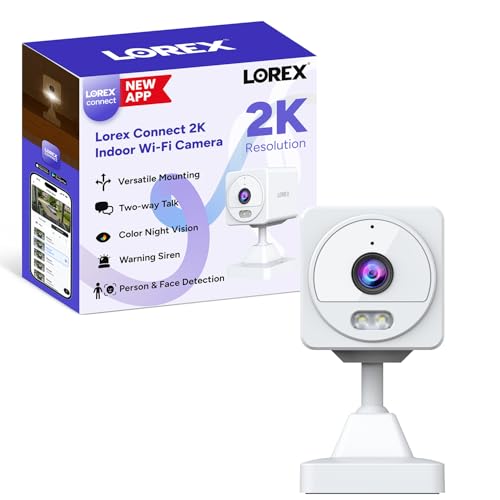
7. Lorex Connect 2K — Best for Local Storage and Privacy Control
If you're serious about keeping your footage off other people's servers, the Lorex Connect 2K is built with you in mind. It supports both local SD card storage and optional cloud storage, so you're never forced into a subscription to save your recordings. The 2K resolution (a step above standard 1080p) means faces and license plates are more legible on playback — useful when you actually need the footage for something.
Color night vision on the Lorex is genuinely impressive. The camera maintains full color in very low-light conditions, not just in near-darkness with a spotlight on it. Person and face recognition alerts narrow down notifications meaningfully — you get a different alert for a recognized face versus an unknown person, which cuts down on the noise of constant generic motion alerts. Versatile mounting options (wall, tabletop, magnetic surface) mean it adapts to wherever you need it in your space.
Privacy mode is a software toggle that disables the camera and microphone on demand, and the new Lorex Connect app is a significant improvement over older Lorex software — faster, cleaner, and more stable. 24/7 continuous recording is supported when using a local SD card, which is rare among cameras in this price range that offer face recognition. For buyers who want premium detection features without handing all their footage to a cloud subscription, the Lorex Connect 2K is the strongest option on this list in 2026.
Keep in mind that if you're worried about your camera being a target for hackers, strong Wi-Fi passwords and regular firmware updates are your first line of defense. The best hidden spy cameras guide covers additional placement strategies if you want covert monitoring alongside your visible deterrent cameras.
Pros:
- 2K resolution — sharper than standard 1080p competitors
- Local SD card + optional cloud storage — no forced subscription
- Color night vision maintains full color in very low light
- Person and face recognition with distinct alert types
- 24/7 continuous recording on local SD
- Flexible mounting: wall, tabletop, or magnetic
Cons:
- Lorex Connect app is improved but still less polished than Ring or Nest
- No battery option — wired power only
- Newer model with a shorter track record than established brands
How to Pick the Best Indoor Security Camera
Resolution and Night Vision
Resolution (measured in pixels) determines how much detail you can see when reviewing footage. 1080p HD is the baseline you should accept for any indoor camera in 2026 — anything lower will leave faces and numbers too blurry to be useful as evidence. Cameras like the REOLINK E1 Pro push to 3K 5MP, which gives noticeably sharper zoom-in detail. Night vision comes in two types: infrared (IR), which produces black-and-white footage in darkness, and color night vision, which adds supplemental light to maintain color. Color night vision is more useful for identification purposes. If you're monitoring a space that's never fully dark (a room with ambient streetlight or a nightlight), color night vision gives you meaningfully better results.
Storage: Cloud vs. Local vs. Both
This is where ongoing costs hide. Most cameras offer free live view but charge a monthly subscription for saving recorded clips to the cloud. Here's how to think through your options:
- Cloud storage — accessible from anywhere, automatic, but requires a subscription and puts your footage on a third-party server
- Local storage (microSD card) — keeps footage on your property, no monthly fee, but you lose it if the camera is stolen or the card fails
- Base Station + local NAS — the Arlo approach; footage stays local on a hub device, not just a card in the camera
- Hybrid — cameras like the Lorex Connect 2K support both local and optional cloud simultaneously, giving you redundancy
If you want to avoid subscriptions entirely, prioritize cameras with microSD slot support and verify that continuous recording (not just motion-triggered clips) is available locally. According to the FTC's guidance on home security camera privacy, you should also review what data your camera manufacturer collects and how long they retain it — something worth checking before committing to any cloud platform.
Smart Home Compatibility
If you already own Alexa devices, Echo Show displays, or Google Home speakers, compatibility with your chosen platform will make your camera significantly more useful day-to-day. Being able to say "Alexa, show me the living room" and see a live feed on your Echo Show without opening an app is a real quality-of-life upgrade. Check compatibility before you buy — not every camera works with every platform. Ring and Blink are Amazon-native. Google Nest lives inside the Google Home ecosystem. WYZE and REOLINK support both Alexa and Google. Lorex is more standalone.
Pan/Tilt vs. Fixed Cameras
Fixed cameras cover one direction. Pan/tilt cameras can be remotely rotated — or set to automatically patrol a space. The trade-off is complexity: more moving parts, more to set up, and sometimes slightly slower responsiveness on live view. For a wide open room, a single pan/tilt camera (like the WYZE Cam Pan v3 or REOLINK E1 Pro) can replace two or three fixed cameras. For a focused entry point like a front door or staircase, a fixed camera is simpler and equally effective. Choose based on the geometry of the space you're covering, not just features on paper.
FAQs
Do indoor security cameras require a monthly subscription?
Not always. Several cameras on this list — including the REOLINK E1 Pro and Lorex Connect 2K — support local microSD card recording with no subscription required. The Arlo VMS3130 includes seven days of free cloud storage. Ring, Blink, and Google Nest offer live view for free but require a paid plan to save and review recorded clips. Factor the ongoing cost of any subscription into your total budget before buying.
Can indoor security cameras work without Wi-Fi?
All cameras on this list require a Wi-Fi connection for setup, live view, and remote access via smartphone. However, cameras with local microSD storage (REOLINK E1 Pro, Lorex Connect 2K, WYZE Cam Pan v3) will continue recording to the card even if your internet connection goes down — you just lose remote access until connectivity is restored. No camera on this list operates fully offline.
What resolution do I actually need for an indoor security camera?
1080p HD is the practical minimum in 2026. It gives you enough detail to identify faces and read text at typical indoor distances (up to about 20 feet). If you need to zoom in on fine details like serial numbers, license plates visible through a window, or smaller faces in a wide room, step up to 2K or 3K. The REOLINK E1 Pro's 3K 5MP sensor and Lorex Connect 2K's 2K resolution both offer a meaningful upgrade over standard 1080p.
Are indoor security cameras easy to hack?
Any internet-connected device carries some risk, but you can reduce it significantly with a few steps: use a strong unique password for your camera account, enable two-factor authentication (2FA) if the app supports it, keep camera firmware up to date, and put your cameras on a separate guest Wi-Fi network if your router supports it. Read our guide on preventing your smart home from being hacked for a full checklist of security practices that apply directly to IP cameras.
Is it legal to use indoor security cameras in my home?
In the United States, recording video in your own home on your own property is legal in all states. Audio recording laws vary — some states require that all parties in a conversation consent to being recorded (two-party consent states). If you share your home with renters, employees, or others, check your state's specific wiretapping and recording laws before enabling two-way audio or continuous audio monitoring. Cameras placed in bathrooms or bedrooms where there's an expectation of privacy raise additional legal issues and are generally prohibited.
What's the difference between an indoor and outdoor security camera?
The main difference is the IP (Ingress Protection) rating — a standardized measure of how well a device resists dust and water. Outdoor cameras typically carry an IP65 or higher rating, meaning they're protected against dust and water jets from any direction. Indoor cameras usually have no IP rating or a lower one. The WYZE Cam Pan v3 is notable for being IP65-rated despite being marketed for both indoor and outdoor use. For strictly indoor placement in climate-controlled spaces, a standard indoor camera is fine. Don't place a non-rated indoor camera in a garage, near a window, or in a humid bathroom.
Buy on Walmart
- WYZE Cam Pan v3 Indoor/Outdoor IP65-Rated 1080p Pan/Tilt/Zoo — Walmart Link
- Blink Mini - Compact indoor plug-in smart security camera, 1 — Walmart Link
- Ring Indoor Cam, Home or business security in 1080p HD video — Walmart Link
- Arlo - Wireless Home Security | Night vision, Indoor/Outdoor — Walmart Link
- Google Nest Cam Indoor - 1st Generation - Wired Indoor Camer — Walmart Link
- REOLINK E1 Pro 3K PT Wi-Fi Indoor Camera for Baby & Pet Moni — Walmart Link
- Lorex Connect 2K Indoor Wi-Fi Camera | New APP | Color Night — Walmart Link
Buy on eBay
- WYZE Cam Pan v3 Indoor/Outdoor IP65-Rated 1080p Pan/Tilt/Zoo — eBay Link
- Blink Mini - Compact indoor plug-in smart security camera, 1 — eBay Link
- Ring Indoor Cam, Home or business security in 1080p HD video — eBay Link
- Arlo - Wireless Home Security | Night vision, Indoor/Outdoor — eBay Link
- Google Nest Cam Indoor - 1st Generation - Wired Indoor Camer — eBay Link
- REOLINK E1 Pro 3K PT Wi-Fi Indoor Camera for Baby & Pet Moni — eBay Link
- Lorex Connect 2K Indoor Wi-Fi Camera | New APP | Color Night — eBay Link
Key Takeaways
- The WYZE Cam Pan v3 2-Pack is the best value on this list — two pan/tilt cameras with color night vision and AI tracking for the price most brands charge for one.
- If avoiding cloud subscriptions is your priority, the REOLINK E1 Pro and Lorex Connect 2K both offer local SD card recording with no monthly fee and sharp 3K/2K resolution.
- For buyers already locked into an ecosystem — Amazon, Ring, or Google — choose the camera that integrates natively: Blink Mini for Alexa, Ring Indoor Cam for Ring Alarm users, and Google Nest Cam for Google Home households.
- No matter which camera you choose, pair it with strong passwords, two-factor authentication, and regular firmware updates to keep your footage private and your network secure.


About Robert Fox
Robert Fox spent ten years teaching self-defence in Miami before transitioning into home security consulting and writing — a background that gives him an unusually practical, threat-aware perspective on residential security. His experience spans physical security assessment, lock and alarm system evaluation, and the behavioral habits that make homes harder targets. At YourHomeSecurityWatch, he covers home security product reviews, background check and criminal records resources, and practical guides on protecting your property and family.
You can Get FREE Gifts. Furthermore, Free Items here. Disable Ad Blocker to receive them all.
Once done, hit anything below