Over 4 billion devices worldwide support WebRTC (Web Real-Time Communication) natively in their browsers, making WebRTC home security applications one of the fastest-growing developments in residential protection today. If you've ever checked a doorbell camera feed straight from your phone without downloading a third-party app, you've already experienced this technology firsthand. Understanding how it works gives you real control over your security setup, and our home security guide covers everything else you need to protect your property.
WebRTC is an open-source framework that lets browsers and apps exchange live video, audio, and data directly between devices, without routing everything through a central cloud server. For your home security cameras, that means faster feeds, stronger privacy, and a system that keeps running even when a third-party service goes offline.
This guide breaks down exactly what WebRTC is, how you set it up, where it outperforms older streaming methods, and what you need to do to use it safely and effectively at home.
Contents
- What WebRTC Is and Why Home Security Needs It
- How to Add WebRTC to Your Home Security Setup
- Where WebRTC Home Security Applications Shine
- WebRTC Security Myths That Are Holding You Back
- Best Practices for Keeping Your WebRTC Feeds Locked Down
- WebRTC vs. Legacy Streaming: A Side-by-Side Look
- Frequently Asked Questions
- Next Steps
What WebRTC Is and Why Home Security Needs It
The Technology Behind the Name
WebRTC stands for Web Real-Time Communication, and it's a free, open standard — meaning anyone can build with it without paying licensing fees — originally developed by Google and now maintained as a formal W3C web standard. It launched in 2011, was ratified officially in 2021, and every major browser — Chrome, Firefox, Safari, and Edge — supports it natively today with no plugins required.
- Peer-to-peer architecture: Your phone connects directly to your camera, cutting out the relay server that slows down older systems on every single request.
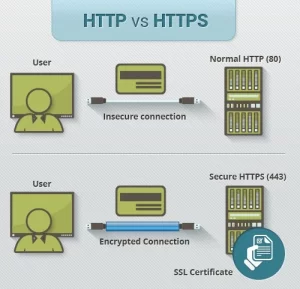
- Mandatory encryption: All WebRTC sessions use DTLS (Datagram Transport Layer Security) and SRTP (Secure Real-time Transport Protocol) — these are built in and cannot be disabled, ever.
- No downloads needed: Your browser handles everything natively, so you access your cameras from any device without installing additional software.
Why Security Cameras Benefit Most
Traditional cameras stream video using RTSP (Real Time Streaming Protocol, a standard from 1996) or HLS (HTTP Live Streaming, which adds 5–30 seconds of delay). WebRTC delivers sub-500-millisecond latency — you see your front door in near real time, not half a minute after someone walked past it. That gap is the difference between reacting and replaying. The history of CCTV and surveillance technology shows that latency has always been the core limitation of remote monitoring — WebRTC removes that barrier at the consumer level.

How to Add WebRTC to Your Home Security Setup
Setting up a WebRTC-enabled home security system is more straightforward than most people expect. You don't need a computer science degree — you need the right hardware, a solid internet connection, and about 30 minutes of focused setup time.
Step 1: Choose a Compatible Camera
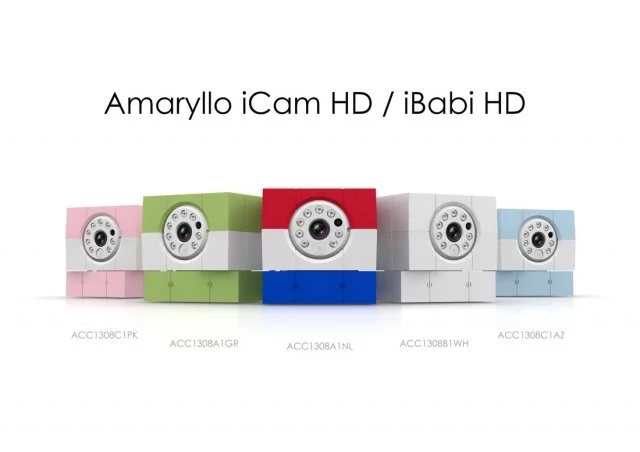
- Look for cameras that advertise WebRTC support explicitly — brands like Amaryllo, Reolink (newer models), and select Wyze firmware versions include it natively in their firmware.
- Avoid cameras locked into proprietary apps that use only RTSP or HLS, since you lose the latency and encryption advantages of WebRTC entirely when you go that route.
- Check that your camera's firmware is up to date before you begin, because manufacturers frequently add WebRTC support through software updates rather than requiring new hardware purchases.
Step 2: Prepare Your Home Network
- Assign your camera a static local IP address (a permanent address on your home network so the camera is always reachable at the same location) through your router's DHCP reservation settings.
- Open the specific port your camera uses for WebRTC signaling — your camera's manual lists this, typically in the 8443 or 443 range.
- Place cameras on a separate VLAN (Virtual Local Area Network, an isolated segment of your home network) if your router supports it, so a compromised camera cannot reach your other connected devices.
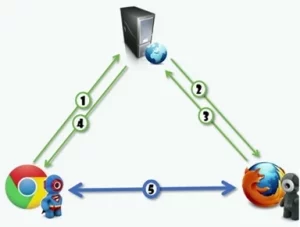
Step 3: Access and Test Your Live Feed
- Open the camera's web interface in any modern browser — no dedicated app is required for WebRTC-native models, which is one of the biggest practical advantages of the protocol.
- Test latency by clapping your hands in front of the camera and watching the feed on your phone; you should see the reaction in under one second if everything is configured correctly.
- If you notice delays or dropped frames, check your upload bandwidth — WebRTC cameras typically need 2–5 Mbps upload per stream for smooth, consistent HD video.
Where WebRTC Home Security Applications Shine
Live Remote Monitoring
WebRTC's biggest strength in WebRTC home security applications is genuine real-time awareness from anywhere in the world. When your motion sensor triggers while you're at work, you open a browser tab and see live video within milliseconds — not a buffered clip recorded 20 seconds ago. That matters most when you're deciding whether to call the police or dismiss a false alarm triggered by a passing car or blowing leaves.
- Monitor multiple camera angles simultaneously in a browser grid without requiring a dedicated NVR (Network Video Recorder, a hardware device for managing multiple camera feeds).
- Share a temporary view-only link with a neighbor or house sitter without handing over your main login credentials.
- Integrate with smart home platforms like Home Assistant to trigger automations — lights, sirens, locks — based on what your camera detects in true real time.
Two-Way Audio and Smart Doorbells
WebRTC handles bidirectional audio just as smoothly as it handles video, which makes it the backbone of modern smart doorbells and two-way security intercoms. You speak, your visitor hears you instantly, and you hear their reply without the 2–3 second echo delay that's common with older RTSP-based doorbell systems.

Pair a WebRTC doorbell with one of the most comprehensive home security systems available and you get a fully integrated, real-time communication layer across your entire property without needing separate intercom hardware or a cloud subscription.
WebRTC Security Myths That Are Holding You Back
Myth: It's Too Technical for Regular Homeowners
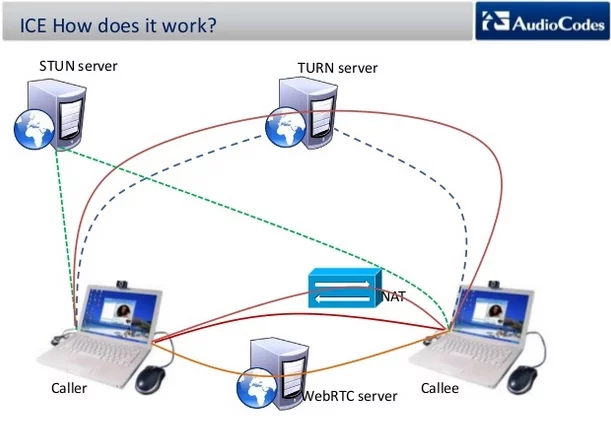
The reality is that most modern WebRTC cameras hide every technical detail behind a clean mobile interface or browser dashboard. You configure your camera the same way you'd set up a new router — log in, follow the steps, and you're live. You don't write code, you don't configure signaling servers, and you don't interact with anything labeled "ICE" (Interactive Connectivity Establishment, the sub-protocol WebRTC uses to punch through firewalls and establish connections) unless you specifically choose a DIY setup.
- Consumer WebRTC cameras from Amaryllo, Furbo, and Ring handle all signaling automatically through their cloud infrastructure with zero user configuration.
- Open-source platforms like go2RTC give technically inclined users full local control without requiring professional installation services.
Myth: WebRTC Is Less Secure Than Older Protocols
This myth has it completely backwards. RTSP sends video in plaintext (unencrypted, readable by anyone who intercepts the packets) by default unless you layer TLS on top of it — a step most consumer cameras skip entirely. WebRTC encrypts every single stream by default with no option to disable it. That means every feed you watch is protected end-to-end, even if someone intercepts the data packets on a public Wi-Fi network, at a hotel, or at a coffee shop.

Best Practices for Keeping Your WebRTC Feeds Locked Down
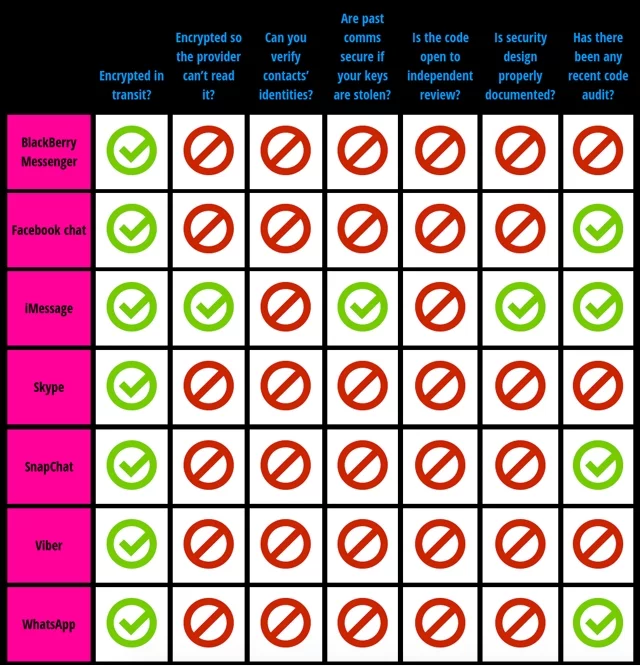
Encryption and Authentication
- Replace factory default passwords immediately on every camera dashboard — default credentials for popular camera brands are publicly indexed online and are the first thing an attacker tries.
- Enable two-factor authentication (2FA, a second verification step beyond your password) on any cloud account linked to your cameras, particularly if you access feeds remotely through a vendor app.
- Verify that your camera's signaling server uses HTTPS by looking for the padlock icon in your browser's address bar before entering any login credentials on the interface.
Network Hygiene
- Update camera firmware on a monthly schedule — manufacturers push WebRTC vulnerability patches regularly, and outdated firmware is the most common entry point for home camera breaches reported to security researchers.
- Disable UPnP (Universal Plug and Play, a setting that lets devices automatically open router ports) on your router if you're manually managing port forwarding for your cameras.
- Layer your digital camera security with strong physical measures — the complete guide to securing your home walks through both physical and network-level protections that complement each other well.
WebRTC vs. Legacy Streaming: A Side-by-Side Look
Feature Comparison Table
Before you choose a new camera system or upgrade an existing one, use this table to understand exactly where each streaming protocol stands on the factors that matter most for home security use.
| Feature | WebRTC | RTSP | HLS |
|---|---|---|---|
| Latency | <500 ms | 1–3 seconds | 5–30 seconds |
| Encryption | Mandatory (DTLS/SRTP) | Optional — requires TLS add-on | Optional — requires HTTPS |
| Browser Support | All major browsers, no plugin | Requires VLC or browser plugin | Native on Safari; plugin elsewhere |
| Two-Way Audio | Built in natively | Limited, inconsistent support | Not supported |
| Firewall Compatibility | High — uses ICE/STUN/TURN | Low — requires manually opened ports | High — uses standard HTTP ports |
| Peer-to-Peer Capable | Yes | No | No |
| Cloud Dependency | Signaling only — stream is direct | High for remote access | High — requires content delivery network |
The comparison is clear: if real-time awareness and mandatory built-in encryption are your priorities — and for home security, they absolutely should be — WebRTC is the right choice for any new camera system you install going forward.
Frequently Asked Questions
What does WebRTC actually do in a home security camera?
WebRTC establishes a direct, encrypted video and audio channel between your camera and your viewing device — your phone or browser — without requiring a third-party server to relay the ongoing stream. This gives you near-instant live video with strong built-in encryption that's always active.
Does WebRTC work without an internet connection?
WebRTC can operate over a local home network (LAN) without internet access, as long as both the camera and your viewing device are on the same network. Remote access from outside your home does require an internet connection for the initial signaling handshake that establishes the connection.
Is WebRTC safer than traditional RTSP camera streams?
Yes. WebRTC mandates DTLS and SRTP encryption on every single connection by design, while RTSP transmits data in plaintext unless you manually configure TLS on top of it — a step most consumer cameras skip entirely. WebRTC is the more secure choice with no extra configuration required from you.
Which home security cameras support WebRTC right now?
Amaryllo cameras are among the earliest and most robust WebRTC implementations available in consumer security hardware. Reolink newer models, Frigate with go2RTC integration, and select Wyze firmware builds also support it, and the list expands with every major firmware update cycle across the industry.
Can I use WebRTC with my existing NVR system?
It depends on your NVR's software capabilities. Open-source platforms like Frigate and Home Assistant paired with go2RTC can act as WebRTC gateways for existing RTSP cameras, effectively upgrading your viewing experience to low-latency, browser-based access without replacing any of your existing hardware.
Does WebRTC use significantly more bandwidth than older streaming protocols?
WebRTC is engineered to adapt to available bandwidth using adaptive bitrate switching, so it scales up or down automatically. In typical home use, expect 2–5 Mbps upload per HD stream — comparable to a well-configured RTSP setup and often lower than unoptimized HLS at equivalent video quality.
What happens to my camera feed if the vendor's cloud server goes down?
With a peer-to-peer WebRTC setup, your feed continues operating over your local network independently because the video stream itself never passes through the cloud server. Cloud infrastructure only handles the initial signaling step, not the ongoing stream, so a server outage doesn't kill your live view.
Next Steps
- Check your current security cameras' manufacturer page for firmware updates and look specifically for WebRTC support in the release notes — many existing cameras already support it without any hardware upgrade.
- Log into your router this week, assign a static IP address to each camera on your network, and test local browser-based access without using your camera's mobile app.
- Audit every camera password you have: replace all factory defaults with unique passwords of at least 12 characters and enable two-factor authentication on every linked cloud account immediately.
- If you're building a new system from scratch, research go2RTC or Frigate as open-source WebRTC-compatible NVR options before committing to any proprietary cloud-locked platform.
- Review the full home security checklist to make sure your physical camera placement and access control measures match the strength of your new digital streaming setup.


About Robert Fox
Robert Fox spent ten years teaching self-defence in Miami before transitioning into home security consulting and writing — a background that gives him an unusually practical, threat-aware perspective on residential security. His experience spans physical security assessment, lock and alarm system evaluation, and the behavioral habits that make homes harder targets. At YourHomeSecurityWatch, he covers home security product reviews, background check and criminal records resources, and practical guides on protecting your property and family.
You can Get FREE Gifts. Furthermore, Free Items here. Disable Ad Blocker to receive them all.
Once done, hit anything below