Most Common Online Security Threats (And How to Protect Yourself)
by Robert Fox
The most common online security threats — phishing, malware, ransomware, botnets, and unauthorized hacking — are actively targeting home users right now, and every connected device on your network is a potential entry point. Understanding how each attack type works, and which defenses actually stop it, is the single most important step you can take toward protecting your data, your finances, and your household. Explore our full online security guides for home users who want layered, practical protection across every digital surface.
Cybercriminals do not handpick victims — they deploy automated tools that scan millions of IP addresses simultaneously, testing for default credentials, unpatched firmware, and predictable passwords at machine speed. The Cybersecurity and Infrastructure Security Agency (CISA) consistently reports that the vast majority of successful breaches exploit familiar, well-documented vulnerabilities, which means your behavior and your configurations determine your exposure more than any other factor.
This guide walks you through each major threat category in plain terms, explains how attackers deploy it in practice, and gives you specific countermeasures you can put in place today — no technical background required.
Contents
- Why Online Security Threats Are a Home Security Issue Too
- The Most Common Online Security Threats at a Glance
- How to Protect Yourself from Each Threat Type
- Security Software and Hardware Tools That Actually Work
- Threat Scenarios That Happen to Real Home Users
- A Long-Term Strategy for Staying Secure Online
- Frequently Asked Questions
Why Online Security Threats Are a Home Security Issue Too
The Expanding Home Attack Surface
Your home network connects far more than a laptop — it includes smart speakers, thermostats, connected cameras, and smart locks, and each device is a potential entry point that attackers probe continuously. Physical security hardware strengthens your perimeter significantly, but every internet-connected component requires equal rigor on the digital side. A connected security camera system like the LaView PoE Security Camera System gives you real-time visibility into your property, but if your network credentials are weak, that same camera can become a foothold for an intruder operating remotely. Smart locks such as the Kwikset 909 SmartCode Electronic Deadbolt add convenient keyless entry, yet the network-facing components demand the same security discipline as every other connected device you own.
How Attackers Select Their Victims
Selection is largely automated — scripts scan IP ranges for open ports, test factory-default credentials against connected devices, and flag vulnerable targets for follow-up exploitation, all without any human reviewing your specific setup. You become a target of opportunity rather than a deliberate choice, which means eliminating the obvious weaknesses is often enough to redirect attackers toward easier prey. The most effective defense is making yourself measurably harder to attack than the next address in the scan queue.
The Most Common Online Security Threats at a Glance
A Direct Comparison of Threat Types
Each of the most common online security threats operates through a distinct mechanism, targets a different asset, and requires a specific countermeasure — which is why a single solution like antivirus software alone is never sufficient. The table below gives you a side-by-side reference so you can match each threat to its appropriate defense immediately.
| Threat | How It Works | Primary Target | Key Defense |
|---|---|---|---|
| Phishing | Deceptive emails or fake sites harvest credentials | Passwords, banking accounts | MFA + link verification |
| Malware / Viruses | Malicious software infects and persists on your device | Files, system control, data | Antivirus + regular OS updates |
| Ransomware | Encrypts your files and demands payment for decryption | Personal and business data | Offline backups + patching |
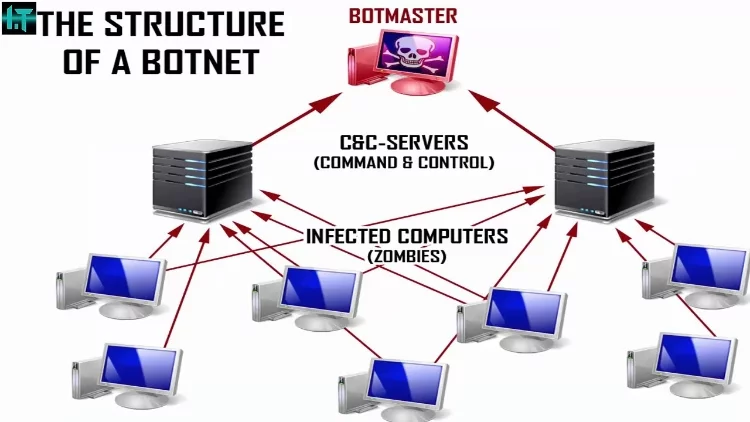
| Botnets | Hijacks your device for coordinated mass attacks | Processing power, bandwidth | Strong passwords + firmware updates |
| Hacking | Direct unauthorized access to accounts or network devices | Accounts, home networks | Unique passwords + MFA |
| IP Spoofing | Fakes a trusted network identity to intercept or redirect traffic | Network sessions, credentials | VPN + encrypted DNS |
Understanding Attack Severity and Impact
Ransomware and phishing generate the highest documented financial losses among individual users, but botnets are arguably the most insidious category because your device can be recruited and weaponized without any visible symptom on your end. Phishing serves as the entry point for the majority of serious account breaches — it tricks you into surrendering credentials that attackers then use to launch secondary attacks across your email, banking, and social accounts. Viruses and worms, which spread by attaching to legitimate files and executing automatically when opened, remain a persistent threat because users still click unfamiliar attachments without verification.
How to Protect Yourself from Each Threat Type
Password and Account Hygiene
Every account you own is a door, and using a unique, complex password for every account is the single highest-impact change most people can make immediately. A password manager generates randomized strings that no dictionary attack can crack and stores them securely so you never need to memorize dozens of credentials.
- Enable multi-factor authentication on every account that supports it — especially email, banking, and cloud storage
- Use a dedicated password manager rather than your browser's built-in storage for sensitive accounts
- Check your email address against breach notification services and rotate any exposed credentials without delay
- Never reuse a password across multiple sites — one breach cascades into many when credentials are shared
Email and Web Browsing Safety
Phishing emails are engineered to look authentic, routinely impersonating banks, delivery couriers, and major platforms with convincing logos and urgent language designed to override your caution. Before clicking any link in an unsolicited message, hover over it to inspect the destination URL, and navigate to the site directly through your browser if anything looks unusual. Treat attachments from unfamiliar senders as hostile by default — and remain cautious even with known contacts, since compromised accounts send malicious files automatically.
- Scrutinize sender addresses character by character — phishers register domains that differ by a single letter
- Refuse to enter credentials on any site that lacks a valid HTTPS certificate
- Install a browser extension that flags known malicious domains before the page loads
Security Software and Hardware Tools That Actually Work
Endpoint Protection Essentials
A modern endpoint security suite does far more than match virus signatures — it uses behavioral analysis to detect and block zero-day threats before they execute on your device. Running any internet-connected device without active endpoint protection is a serious and unnecessary risk that no other security measure fully compensates for. Keep your security software set to update automatically so new threat definitions are applied the moment they are released, closing the window of exposure as tightly as possible.
For home users who want to integrate digital protection with physical security, biometric identity tools like those explored in Luxand's FaceSDK for Home Security Applications show how advanced identity verification strengthens the full defense stack rather than just one layer of it.
Network-Level Defense
Your router is the single gateway through which all your household traffic flows, and most home routers ship with factory credentials that attackers maintain in publicly available databases. Change your router's admin password immediately after setup, disable remote management unless you have a specific need for it, and place IoT devices on a separate guest network so a compromised smart bulb cannot reach your banking sessions.
- Enable WPA3 encryption on your Wi-Fi network — or WPA2-AES as a minimum acceptable standard
- Apply router firmware updates as soon as the manufacturer releases them to close known vulnerabilities
- Configure a DNS-level security filter such as Quad9 or Cloudflare Gateway to block malicious domains before they resolve
- Disable Universal Plug and Play (UPnP) on your router, since it is a well-documented attack vector for botnet recruitment
Threat Scenarios That Happen to Real Home Users
Smart Device Vulnerabilities in Practice
Smart home devices are frequently enrolled on home networks and then neglected — firmware goes unpatched for months, default credentials remain unchanged, and the devices sit silently vulnerable while attackers scan for exactly that profile. Understanding how IP address spoofing works clarifies why traffic appearing to come from a trusted device inside your network may actually originate from an attacker who has compromised it. Pairing digital hardening with robust physical access control — such as the pick-resistant design reviewed in the Medeco Maxum Deadbolt review — creates a defense posture where both the physical and digital perimeters require serious effort to breach.
The Risks of Public and Shared Networks
Public Wi-Fi at coffee shops, airports, and hotels creates ideal conditions for man-in-the-middle attacks, where an attacker positions themselves between your device and the network to intercept unencrypted traffic flowing through. A VPN encrypts your connection end-to-end, rendering intercepted data unreadable regardless of how it was captured. Never access banking portals, medical records, or work systems on public Wi-Fi without an active VPN connection running — the risk is direct and the protection is straightforward.
A Long-Term Strategy for Staying Secure Online
Building Consistent Security Maintenance Habits
Security is a continuous practice, not a one-time configuration — attackers refine their tools constantly, and a device that was secure six months ago may be exposed today due to a newly discovered vulnerability. Apply operating system and application updates as soon as they are released, since each patch directly closes a door that an active exploit may already be testing.
- Enable automatic updates across your OS, browser, and all installed applications without exception
- Back up critical data to an offline or air-gapped drive weekly — ransomware cannot encrypt what it cannot reach
- Audit the devices connected to your home network monthly and investigate anything you do not recognize
- Review permissions granted to third-party apps quarterly and revoke access for services you no longer actively use
Adapting to New and Evolving Attack Techniques
The most common online security threats evolve in their delivery mechanisms but consistently exploit the same human and technical weaknesses — weak credentials, unpatched software, and uncritical clicking. Following security advisories from agencies like CISA and established cybersecurity news sources keeps you aware of new phishing campaigns, emerging malware strains, and zero-day vulnerabilities before they reach your devices at scale. Combining vigilant digital habits with strong physical security — quality locks, monitored surveillance systems, and controlled access to your property — creates a layered defense that significantly raises the cost and complexity of targeting your home.
Frequently Asked Questions
What is phishing and how do I recognize it?
Phishing is a social engineering attack in which criminals send deceptive emails or create fake websites that impersonate trusted brands to steal your login credentials or financial information. You can recognize it by checking the sender's actual email address carefully, hovering over links before clicking, and watching for urgent language designed to pressure you into acting without thinking.
How do I know if my device has been recruited into a botnet?
Botnet infections often produce subtle signs — unusually high CPU or bandwidth usage when your device is idle, sluggish performance, or your internet provider flagging unusual outbound traffic from your IP address. Running a full antivirus scan and reviewing your router's connected devices list are the fastest ways to investigate, and a clean reinstall of your operating system is the most thorough remediation if a botnet infection is confirmed.
What is the difference between malware and a virus?
A virus is a specific subcategory of malware — it is malicious code that replicates by attaching itself to legitimate files and spreading when those files are shared. Malware is the broader term covering all malicious software categories, including ransomware, spyware, trojans, worms, and adware, each with distinct behaviors and payloads beyond self-replication.
Is a VPN enough to protect me from all online threats?
A VPN encrypts your internet traffic and masks your IP address, which effectively prevents man-in-the-middle attacks on public networks and limits certain types of tracking, but it does not protect you from phishing, malware downloaded from malicious sites, or compromised credentials. A VPN is one layer in a complete security stack, not a standalone solution for all threat categories.
How should I secure the smart devices on my home network?
Change factory-default credentials on every smart device immediately after setup, apply firmware updates as soon as the manufacturer releases them, and isolate your IoT devices on a separate guest network segment so that a compromised device cannot access your computers or accounts. Disabling remote access features you do not actively use reduces the number of open ports an attacker can probe.
What should I do immediately after a ransomware attack?
Disconnect the infected device from your network immediately to prevent the ransomware from spreading to other devices, then assess whether your offline backups are intact and unaffected — restoring from a clean backup is the standard recovery path that avoids paying the ransom. Report the incident to the FBI's Internet Crime Complaint Center (IC3) and contact your internet provider, since some ransomware strains also exfiltrate data before encrypting it.
How often should I change my passwords?
You should change passwords on high-value accounts — email, banking, and cloud storage — immediately whenever you receive a breach notification, and as a general practice every six to twelve months for accounts you use regularly. Using a password manager to generate and store unique credentials for every site removes the practical barrier that causes most people to reuse the same password across dozens of services.
The most common online security threats succeed not because they are sophisticated, but because most people give them an open door — close the obvious gaps and you eliminate the vast majority of your risk.


About Robert Fox
Robert Fox spent ten years teaching self-defence in Miami before transitioning into home security consulting and writing — a background that gives him an unusually practical, threat-aware perspective on residential security. His experience spans physical security assessment, lock and alarm system evaluation, and the behavioral habits that make homes harder targets. At YourHomeSecurityWatch, he covers home security product reviews, background check and criminal records resources, and practical guides on protecting your property and family.
You can Get FREE Gifts. Furthermore, Free Items here. Disable Ad Blocker to receive them all.
Once done, hit anything below