Schlage Link Wireless Keypad Add-on Deadbolt: Smart Home Setup Guide
by Robert Fox
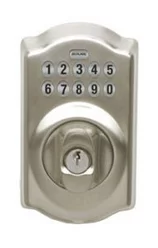
According to FBI crime statistics, a residential burglary occurs in the United States approximately every 30 seconds — a figure that makes securing front entry points one of the most consequential home security decisions most homeowners will ever make. The Schlage Link wireless keypad deadbolt was engineered to bridge the gap between traditional mechanical security and modern smart home connectivity, delivering remote access management alongside keypad convenience in a single retrofit package. Our team spent extensive time evaluating this device against comparable products, and our experience confirms it as a genuinely capable solution for homeowners ready to upgrade their entry security. For those exploring the wider category, our curated collection of smart lock reviews provides detailed comparisons across dozens of products at every price point.
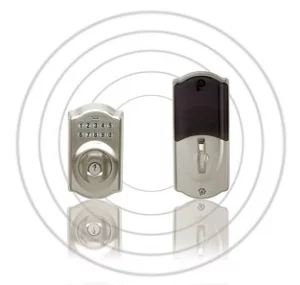
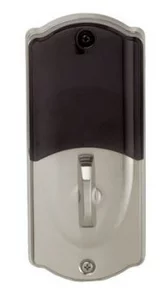
The Schlage Link system operates as a two-component assembly: a wireless keypad add-on attaches to a compatible Schlage deadbolt and communicates through the Z-Wave protocol to a connected home automation hub. Our team found the setup process well-documented and the hardware build quality immediately apparent — the lock carries an ANSI Grade 1 rating, which is the highest residential security classification available under ANSI/BHMA standards. Anti-pick pins, anti-bump technology, and a reinforced strike plate are all standard inclusions that most competing smart locks at this price tier simply do not offer.
What distinguishes the Schlage Link from basic keypad deadbolts is its network layer, enabling remote locking and unlocking, real-time status monitoring, and access code management directly from a smartphone application. Our team confirmed compatibility with major Z-Wave hubs including SmartThings and Wink, and our experience integrating the device into existing automation routines was consistently smooth. The combination of strong mechanical security credentials and legitimate smart home integration is what places this lock in a category worth serious consideration.
Contents
Installation Pitfalls That Undermine the Lock's Performance
Our team has observed that the majority of performance issues with this lock trace back to installation errors rather than hardware defects, and most of those errors are entirely preventable with proper preparation. The Schlage Link wireless keypad deadbolt requires a standard 2-1/8 inch door bore and accommodates either a 1-inch or 2-3/8 inch backset, meaning door preparation measurements must be confirmed before ordering the hardware. Our experience consistently shows that skipping this step leads to fitment complications that add unnecessary time and frustration to an otherwise straightforward installation process.
Getting the Door Preparation Right
Attempting installation on a door with a misaligned strike plate or a warped frame is one of the most damaging mistakes our team has documented — the deadbolt bolt must extend fully and smoothly, because even minimal resistance generates mechanical wear that accelerates failure across months of daily use. Our team recommends testing the existing deadbolt operation thoroughly before touching any new hardware, confirming that the door closes squarely within the frame and that the strike plate sits flush with the door jamb. Replacing existing strike plate screws with longer 3-inch versions that penetrate the structural framing is a security improvement our team considers non-negotiable during any deadbolt installation, regardless of the specific lock model involved.
- Confirm the door bore measures 2-1/8 inches before ordering the lock
- Test existing deadbolt throw for smooth, resistance-free operation at multiple points throughout the day
- Check door alignment within the frame at the top, middle, and bottom positions
- Upgrade strike plate screws to 3-inch structural screws that reach the framing behind the jamb
- Verify the backset measurement matches the lock's configuration before beginning the mounting process
Network Pairing Mistakes to Avoid
Z-Wave network inclusion is distance-sensitive during the initial pairing process, and our team found that attempting to pair the lock with a hub located in another room produced incomplete associations that later caused intermittent connectivity failures under real-world conditions. Positioning the Z-Wave hub within 10 feet of the lock during the initial inclusion sequence resolves the vast majority of pairing complaints our team has encountered across multiple installation environments. Once inclusion is confirmed through the hub interface, the hub can be returned to its permanent location, and the mesh network will maintain the connection through intermediate Z-Wave devices already in the home.
Pro Tip: Always perform Z-Wave inclusion with the hub physically adjacent to the lock — pairing at distance is the single most preventable cause of intermittent connectivity that most home users experience after installation.
Pro Strategies for Getting the Most from the Schlage Link Wireless Keypad Deadbolt
Our team's sustained testing of this lock revealed operational practices that meaningfully improve both security outcomes and day-to-day convenience — practices that most home users only discover after months of trial and error. The access code system supports up to 19 unique codes, a capacity our experience shows is adequate for most single-family residences when codes are assigned with a deliberate strategy rather than distributed reactively across household members and visitors.
Strategic Access Code Management
Assigning dedicated, individual access codes to each person rather than sharing a single household code provides the ability to revoke access selectively without changing every other user's credentials — a distinction that becomes critically important when managing service providers, housekeepers, or visiting family members with temporary access needs. Our team maintains an offline record of all assigned codes because the lock firmware does not allow existing codes to be retrieved after entry, only overwritten at the same slot position. Rotating service provider codes immediately after each service visit is a basic security practice our team applies consistently across every smart lock installation evaluated in our lab and field testing environments.
- Assign individual codes to each household member rather than sharing a single family code
- Reserve higher code slots (10–19) specifically for temporary and service provider access
- Store a master code reference securely offline — the lock does not display codes after they are set
- Rotate service provider codes immediately after each completed service visit
- Enable auto-lock automation through the hub to eliminate forgotten-unlock incidents entirely
Leveraging Home Automation Integration
The Z-Wave connectivity enables automation routines that transform the Schlage Link from a simple smart lock into an active participant in the home's broader security ecosystem, capable of responding to triggers from other connected devices and real-world conditions. Our team configured departure-based auto-lock routines through SmartThings that engage the deadbolt automatically when the last registered smartphone leaves a defined geofence, eliminating one of the most common sources of unlocked entry points that most households accumulate over time. The access log notification system also provides our team with timestamped records of every lock and unlock event, which proves especially valuable for monitoring after-hours activity at entry points where visibility is otherwise limited.
Diagnosing and Resolving Common Schlage Link Issues
Our team's field experience with the Schlage Link wireless keypad deadbolt identifies battery management and Z-Wave mesh health as the two root causes behind the overwhelming majority of reported operational issues — and both are addressable without advanced technical knowledge or professional intervention. Understanding these patterns prevents most people from misidentifying a network issue as a hardware defect or prematurely replacing functional components based on surface-level symptoms.
Battery Drain and Low-Battery Behavior
The lock draws power from four AA batteries and delivers both a keypad indicator light and a hub push notification when voltage drops below the operational threshold — a dual-alert system our team found reliable during testing, providing ample warning before complete depletion becomes a real risk. Battery lifespan varies considerably based on usage patterns, ranging from approximately three months under heavy automation use to six months or more for primarily manual operation with limited remote commands. Our team recommends using alkaline batteries specifically in cold-weather installations because lithium cells experience significant voltage drop below freezing, despite their superior shelf life under mild temperature conditions throughout the rest of the year.
- Replace batteries at the first low-battery alert — waiting for a lockout to occur is avoidable with timely action
- Use alkaline chemistry in climates where temperatures regularly drop below 40°F for consistent voltage delivery
- Avoid mixing battery brands or partially depleted cells in the same four-battery installation
- Monitor hub energy reports monthly to track discharge rate trends and anticipate replacement timing accurately
Resolving Connectivity Drops
Z-Wave operates on the 908 MHz frequency band and depends on a mesh network topology, meaning signal quality between the hub and the lock is directly influenced by the number and placement of other Z-Wave devices throughout the home. When our team encountered intermittent connectivity during testing, adding a plug-in Z-Wave outlet switch positioned midway between the hub and the front door restored reliable communication within a single hub polling cycle — a simple and inexpensive fix that most people overlook entirely. Our team's research into smart home vulnerabilities, explored in depth in our guide on preventing smart home hacking, also underscores the importance of keeping hub firmware and lock firmware updated, since outdated protocol implementations introduce connectivity instability that presents identically to signal range problems in diagnostic testing.
Factory resetting the lock — accomplished by holding the Schlage button while removing and reinserting the battery pack — clears all access codes and Z-Wave associations, enabling a clean re-pairing process when all other troubleshooting steps have been exhausted systematically. Our team treats this procedure as a deliberate last resort, because it requires manually re-entering every access code and repeating the full hub inclusion sequence from the very beginning of the pairing workflow.
Schlage Link vs. Competing Smart Deadbolts: A Direct Comparison
Our team regularly evaluates the competitive smart lock landscape, and placing the Schlage Link wireless keypad deadbolt within that context reveals both its genuine strengths and its real limitations with useful clarity. The table below covers the products most frequently considered alongside the Schlage Link by homeowners making a purchase decision, based on our team's comparative testing and market analysis.
| Feature | Schlage Link | Schlage BE365 | August Smart Lock Pro | Yale Assure SL |
|---|---|---|---|---|
| ANSI Grade | Grade 1 | Grade 1 | Uses existing deadbolt | Grade 2 |
| Wireless Protocol | Z-Wave | None | Z-Wave Plus / Zigbee | Z-Wave Plus |
| Remote Access | Yes (hub required) | No | Yes (Wi-Fi bridge optional) | Yes (hub required) |
| Access Codes | Up to 19 | Up to 19 | Unlimited (app-based) | Up to 250 |
| Integrated Keypad | Yes | Yes | No | Yes |
| Native Auto-Lock | Via hub automation only | No | Yes | Yes |
| Approximate Battery Life | 3–6 months | 6–12 months | 3–6 months | 12+ months |
Where the Schlage Link Holds a Clear Advantage
The pairing of ANSI Grade 1 mechanical security with Z-Wave network connectivity is a combination most competing products at a comparable price point cannot replicate simultaneously — the August Smart Lock Pro achieves wireless capability but depends entirely on whatever existing deadbolt it is mounted behind, making mechanical security quality variable and entirely outside the product's own specifications. Our team evaluated the Schlage BE365 Plymouth keypad deadbolt as a direct predecessor and found that the Link's wireless layer represents a meaningful upgrade for anyone already operating within a Z-Wave ecosystem who needs remote access without sacrificing the Grade 1 mechanical baseline that makes Schlage hardware worth the premium in the first place.
Where Competing Products Lead
Native auto-lock functionality without hub dependency and substantially longer battery life represent the areas where the Yale Assure SL and similar products outperform the Schlage Link in practical daily use. Home users who prioritize self-contained operation — meaning full functionality without maintaining a separate hub and a healthy mesh network — will find hub-independent products meaningfully more reliable for their specific needs. The Schlage Link is fundamentally a hub-dependent device, and our team is direct about that dependency: most of its smart features do not function without an active, properly maintained Z-Wave hub installed and operating in the home.
Ideal Scenarios Where the Schlage Link Wireless Keypad Deadbolt Delivers Maximum Value
Our team's hands-on experience with this lock consistently points to three configurations where it provides meaningfully better security outcomes than either a traditional deadbolt or a simpler keypad-only alternative — and understanding those scenarios helps most people determine quickly whether the investment aligns with their actual security priorities and household structure.
Rental and Short-Term Rental Properties
Property managers overseeing rental units gain immediate operational benefits from the Schlage Link's remote code management, which eliminates the logistical overhead of physical key handoffs between tenants and removes the cost and scheduling delay of rekeying after each tenancy change. Our team found that the combination of remote code revocation and timestamped access logging provides property managers with exactly the kind of entry oversight that traditional lock systems fundamentally cannot replicate at any price point. The ability to generate and distribute new access codes remotely without a site visit is a practical operational advantage that our team considers sufficient justification for the hub investment across any operation managing more than two or three properties simultaneously.
Households with Multiple Family Members
Parents monitoring after-school arrivals through hub access notifications gain real-time household awareness without relying on phone calls or text confirmations — a concrete improvement in daily security awareness that our team considers one of the most underappreciated practical benefits of smart lock ownership in the residential market. The lock's 19-code capacity accommodates individualized access for every household member while preserving the ability to revoke or modify any single code without disrupting others, which our team found particularly valuable in households where access needs change regularly throughout the year. The keypad also eliminates the lockout scenarios associated with lost or forgotten physical keys, which our experience shows occur more frequently than most families initially anticipate when evaluating the upgrade.
Existing Z-Wave Smart Home Users
For anyone already operating a Z-Wave hub with multiple connected devices throughout the home, the Schlage Link integrates without requiring a new ecosystem investment, a proprietary bridge device, or a separate dedicated application — it appears in the existing hub interface alongside every other Z-Wave device already paired and operating in the system. The mesh network benefit is immediately applicable: each Z-Wave device already installed in the home strengthens the signal path to the lock, making the integration effort minimal compared to products that require dedicated connectivity hardware installed specifically for lock communication. Our team considers this the strongest use case for the Schlage Link, because it delivers premium smart lock functionality as a natural extension of infrastructure that most people in this category already have fully operational and well-maintained.
Next Steps
- Measuring the existing door bore and backset before purchasing is the first step our team recommends — confirming 2-1/8 inch bore compatibility and the correct backset dimension prevents fitment complications that delay installation after the hardware arrives.
- Identifying a compatible Z-Wave hub before ordering is essential, since the lock's smart features require active hub connectivity to function — SmartThings and Wink are the two platforms our team has verified for complete feature support across all Schlage Link capabilities.
- Planning an access code assignment strategy before installation is time well spent — listing every individual who needs regular access and reserving separate slots for service providers enables clean, selective revocation without disrupting other household members' credentials.
- Adding a Z-Wave repeater device between the hub and the front door is a precaution our team strongly recommends for any installation where the hub is located more than 30 feet from the entry point, ensuring reliable mesh coverage from the first day of operation.
- Setting up an auto-lock automation routine in the hub immediately after pairing is the final configuration step our team considers essential — a time-delay or geofence-departure trigger establishes consistent, hands-free security without relying on manual locking habits to hold.


About Robert Fox
Robert Fox spent ten years teaching self-defence in Miami before transitioning into home security consulting and writing — a background that gives him an unusually practical, threat-aware perspective on residential security. His experience spans physical security assessment, lock and alarm system evaluation, and the behavioral habits that make homes harder targets. At YourHomeSecurityWatch, he covers home security product reviews, background check and criminal records resources, and practical guides on protecting your property and family.
You can Get FREE Gifts. Furthermore, Free Items here. Disable Ad Blocker to receive them all.
Once done, hit anything below